WerkIQ LMS

Turn workplace learning into measurable progress

Create a searchable course catalogue, assign learning to employees, and follow every enrollment from signup to evaluation and certification. WerkIQ LMS gives learners, instructors, and HR one clear system of record.

WerkIQ LMS

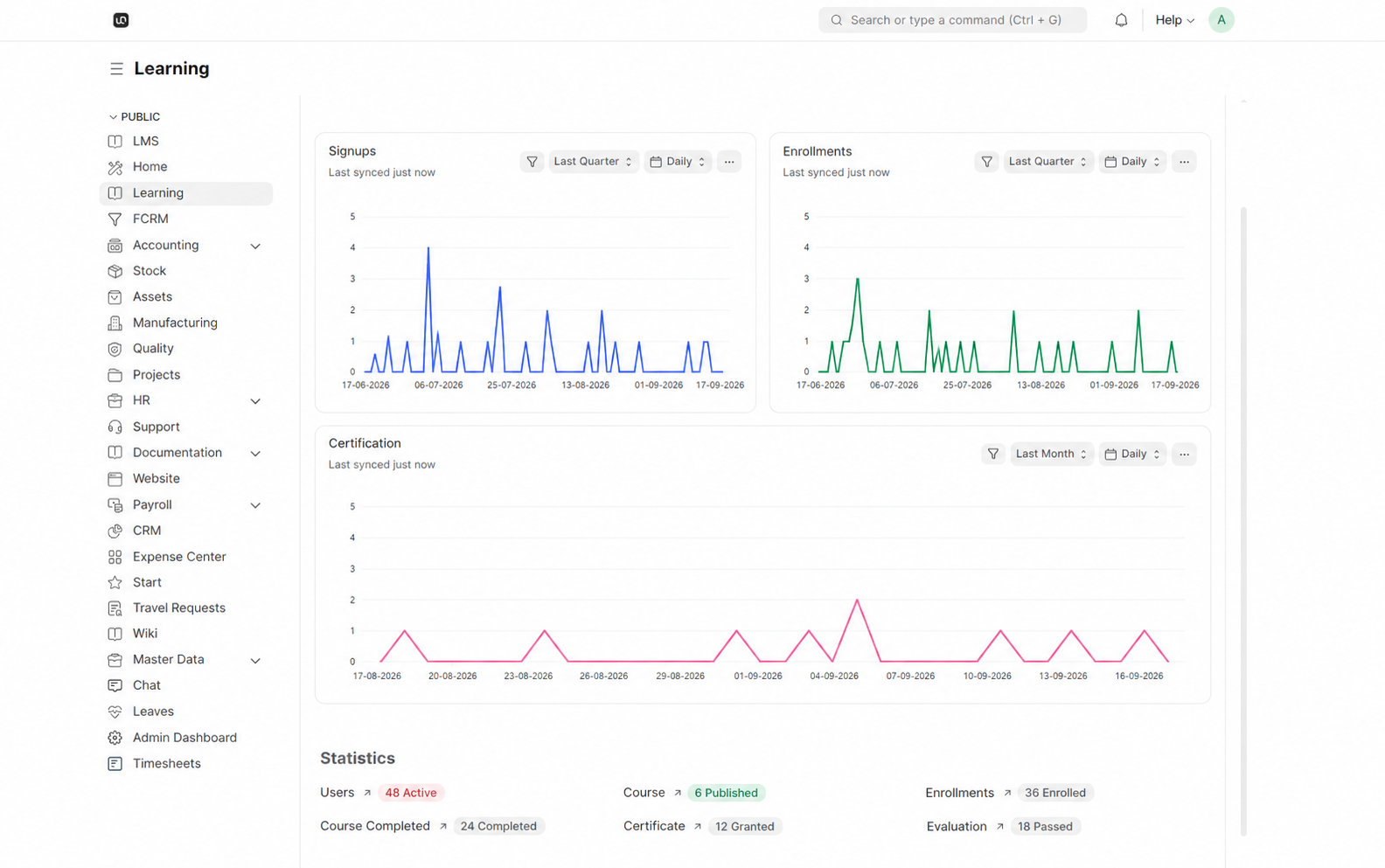
WerkIQ LMS dashboard showing signups, enrollments, certifications, and learning statistics
Learning, Measured

Manage the complete learning journey in one place.

Publish training such as WerkIQ Fundamentals, GDPR, leadership, and workplace safety. Enroll the right people, see their completion percentage, evaluate outcomes, and keep every certificate connected to the learner record.

How it works

A clear path through WerkIQ LMS

Each step stays connected, so information moves forward without re-entry, hidden handoffs, or separate spreadsheets.

  1. 1

    Course Catalogue

    Create, review, and publish structured courses for every team and role.
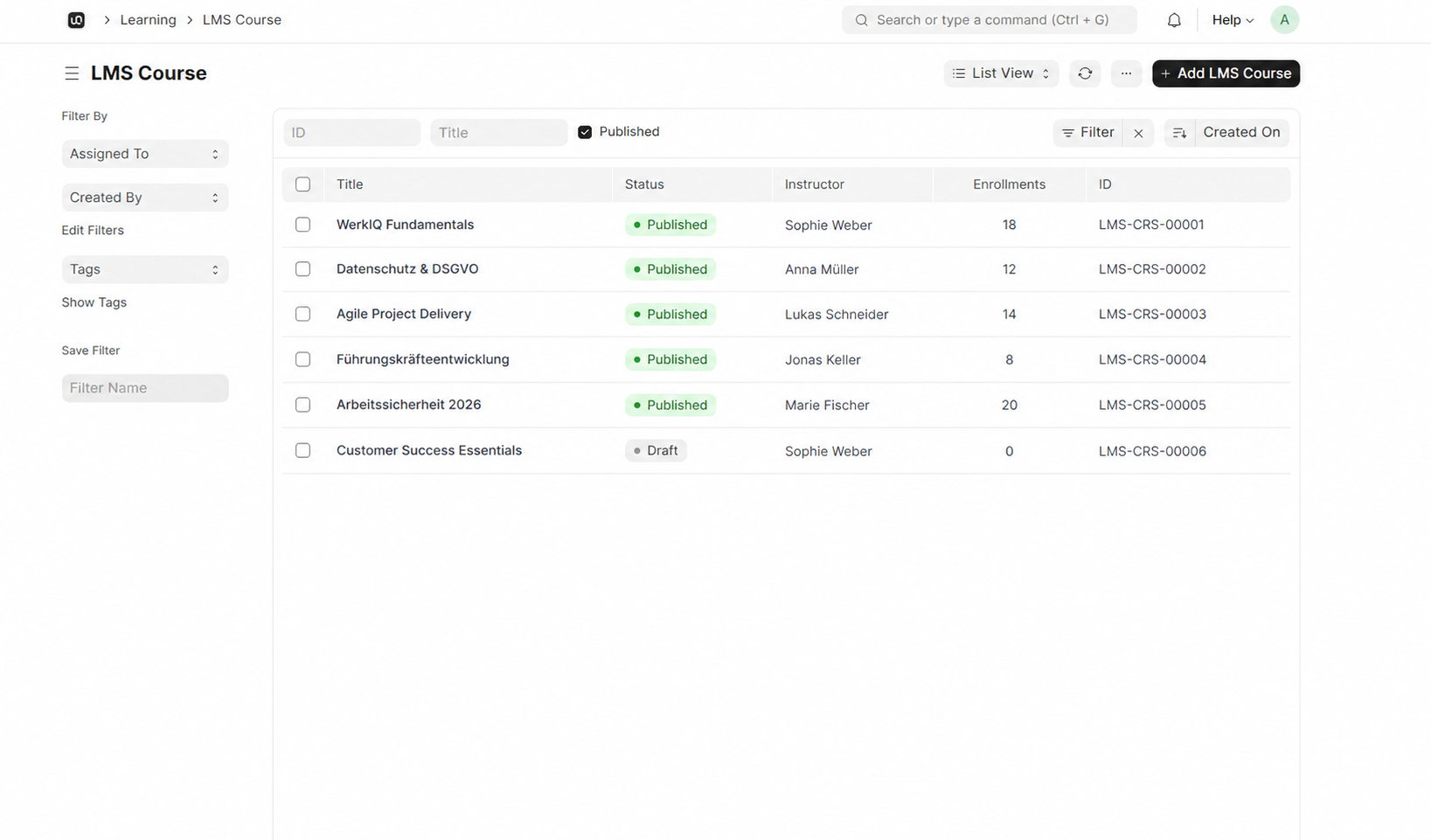
    Draft and published status

  2. 2

    Learner Enrollments

    Assign courses to individuals or groups and keep every learner's status visible.
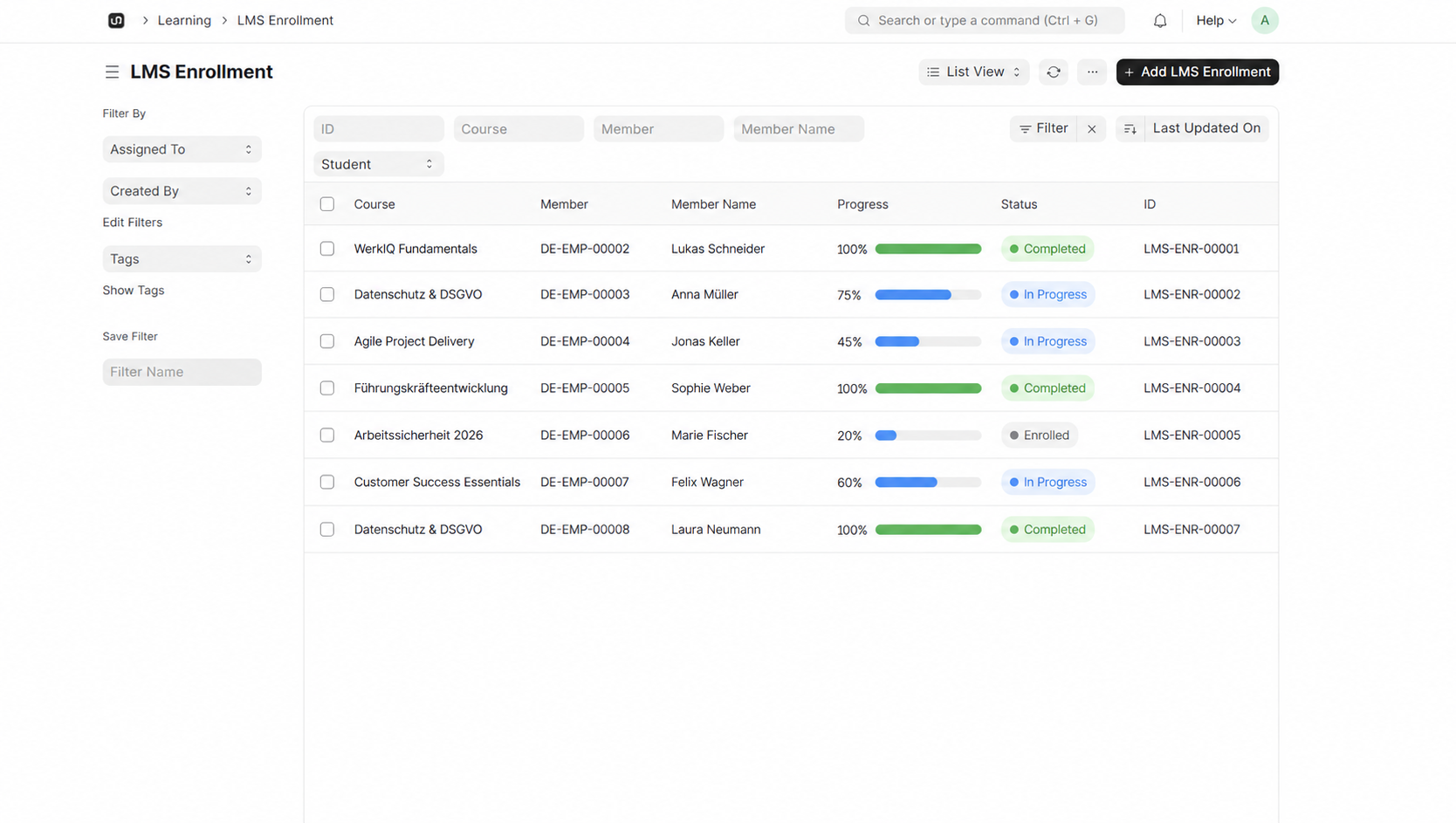
    Individual and bulk enrollment

  3. 3

    Lessons & Assessments

    Combine learning content with evaluations that prove understanding.

    Video, document, and text lessons

  4. 4

    Certification

    Grant certificates when learners complete the required content and evaluations.

    Automatic certificate grants

See it in action

Real workflows, shown clearly

Explore the screens your teams use every day—from overview and planning to the records that keep work accountable.

Course Catalogue interface in WerkIQ

Course Catalogue

Create, review, and publish structured courses for every team and role.

Learner Enrollments interface in WerkIQ

Learner Enrollments

Assign courses to individuals or groups and keep every learner's status visible.

Lessons & Assessments interface in WerkIQ

Lessons & Assessments

Combine learning content with evaluations that prove understanding.

Everything You Need in an LMS

Course Catalogue

Create, review, and publish structured courses for every team and role.

  • Draft and published status
  • Course titles and descriptions
  • Chapters, lessons, and resources
  • Instructor ownership
  • Internal and external learning
  • Course categories and tags
  • Enrollment counts

Learner Enrollments

Assign courses to individuals or groups and keep every learner's status visible.

  • Individual and bulk enrollment
  • Member and employee records
  • Enrolled, in-progress, and completed states
  • Live completion percentages
  • Required learning by department
  • Onboarding learning paths
  • Complete enrollment history

Lessons & Assessments

Combine learning content with evaluations that prove understanding.

  • Video, document, and text lessons
  • Quizzes and assignments
  • Pass marks and attempt limits
  • Evaluation results
  • Assessment score tracking
  • Instructor feedback
  • Learner completion rules

Certification

Grant certificates when learners complete the required content and evaluations.

  • Automatic certificate grants
  • Issue and expiry dates
  • Renewal reminders
  • Course completion requirements
  • Compliance certification tracking
  • Downloadable credentials
  • Certificate audit trail

Instructor-Led Learning

Coordinate scheduled learning alongside self-paced courses.

  • Session scheduling
  • Calendar view
  • Room & location booking
  • Trainer availability
  • Learner attendance
  • Session reminders
  • Recurring sessions

Learning Dashboard

See learning activity and outcomes without assembling reports by hand.

  • Signup trends
  • Enrollment trends
  • Certification trends
  • Active learner totals
  • Published course totals
  • Completed course totals
  • Passed evaluation totals

Training Assignments

Assign training to individuals or groups.

  • Individual assignments
  • Department-wide rollout
  • New hire auto-assignment
  • Due date setting
  • Assignment notifications
  • Re-assignment on role change
  • Assignment history

Training Reports

Measure learning outcomes across the organization.

  • Completion rate reports
  • Certification compliance
  • Skill gap analysis
  • Training hours summary
  • Department training status
  • Overdue training list
  • Export to Excel & PDF

Automate

Learning Automation That Keeps People Moving

Assign the right course, follow progress, and act before deadlines are missed.

  • New hire training assignments
  • Department-wide course enrollment
  • Certification expiry reminders
  • Training deadline alerts
  • Completion confirmation emails
  • Overdue training notifications
  • Session reminder emails
  • Role change training triggers
  • Manager progress updates

Reports Include

Learning Reports & Analytics

Track participation, progress, outcomes, and certification across the organization.

  • Signup and enrollment trends
  • Training completion summary
  • Certification compliance status
  • Course progress by learner
  • Evaluation pass rates
  • Overdue training report
  • Course enrollment trends
  • Assessment score analysis
  • Trainer utilization
  • Active learner report
  • Certificate grants and expiries

Why Choose WerkIQ Training Management

One Learning Record

Courses, enrollments, results, and certificates stay connected to each learner.

Compliance Ready

Track certifications and mandatory training with expiry alerts.

Visible Progress

See who is enrolled, in progress, completed, or overdue at a glance.

HR Integrated

Training connects with onboarding, performance, and employee records.

Automated Assignments

New hires and role changes trigger the right training automatically.

Actionable Analytics

Dashboards show signups, enrollments, completion, evaluations, and certificates.

Integrations

Connect training management with your HR and learning tools.

Swipe or use arrows to browse integrations

Microsoft 365
Google Workspace
Slack
Microsoft Teams
Outlook
Calendar tools
LMS platforms
LDAP / SSO
Email services
REST API
Webhooks

Features

Security & Permissions

Control who can assign, view, and manage training records.

  • L&D admin permissions
  • Manager training visibility
  • Certification access controls
  • Audit logs
  • Two-factor authentication
  • Single Sign-On (SSO)
  • Training record encryption

Frequently Asked Questions

Yes. Create courses in draft, publish them when ready, and enroll individuals, departments, or larger learner groups.

Build a Learning Culture You Can Measure

Give learners a clear path forward and give HR the course, enrollment, evaluation, and certification data needed to improve it.

Prefer to talk live? Book a meeting on Cal.com